CygNet and Third-Party ActiveX Controls
 Use the ActiveX tool to insert any of a large list of ActiveX control objects into TheView. This includes both CygNet ActiveX controls and third-party ActiveX controls. For example, you could place a date/time chooser, a custom pie chart control to display percent values, or a Shockwave Flash object to show an animation. If the ActiveX control is to represent data, it will have to be scripted. Consult the manufacturer’s documentation for more information regarding the control’s properties, methods, and events.
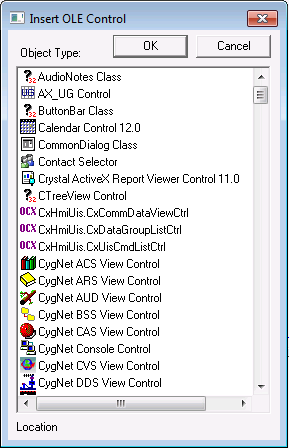
When you add an ActiveX control, the Insert OLE Control selection box displays a list of all ActiveX controls registered on your computer. Keep in mind that users of the screen must also have the control registered on their computer. If using third-party controls, you can use CygNet Version Management to distribute the control with CygNet Studio and CygNet Vision.
To Add a CygNet or Third-Party ActiveX Control to TheView
- In the Standard Tools toolbar, click the ActiveX tool and then drag to place the object on TheView.
- Select the name of the control from the Insert OLE Control box and click OK.
- Configure the properties of the control. Most of the properties will be on the ActiveX page on the Property Sheet. See Configuring Object Properties for more information.

